1. 导入demo数据 load csv方式(适合热更新,无需停服务) 1 2 3 4 5 6 7 8 9 10 11 12 13 // demo数据的导入例子 LOAD CSV WITH HEADERS FROM "file:///RetailRecommendationsDemoDataProduct.csv" AS row MERGE (parent_category:Category {name : row.parent_category})MERGE (category :Category {name : row.category})MERGE (category )-[:PARENT_CATEGORY]->(parent_category)MERGE (p:Product {sku: toString(row.sku)})SET p.name = row.name, p.price = toFloat(row.price) MERGE (p)-[:IN_CATEGORY]->(category )MERGE (d:Designer {name : row.designer})MERGE (p)-[:DESIGNED_BY]-(d)RETURN *;
1 2 3 4 5 6 7 8 9 10 11 12 13 14 15 16 17 18 19 20 21 22 23 24 25 26 // 智子推荐增量数据导入例子 LOAD CSV WITH HEADERS FROM "file:///sales_xxxxxxxx.csv" AS row MERGE (buyer:User {buyer_nick: row.buyer_nick})MERGE (plat:Platform {platform_code: row.platform_code})SET plat.platform_name = row.platform_nameMERGE (brand:Brand {brand_id: row.brand_id})SET brand.brand_name = row.brand_nameMERGE (store :Store {store_id: row.store_id})SET store.store_name = row.store_nameMERGE (c:Category {category_code: row.category_code})SET c.category_code = row.category_codeMERGE (s:Season {season: row.season})SET s.season_name = row.season_nameMERGE (p:Product {platform_code: row.platform_code})SET p.product_name = row.product_nameMERGE (p)-[:IN_CATEGORY]->(c)MERGE (p)-[:IN_SEASON]->(s)MERGE (p)-[:IN_BRAND]-(brand)MERGE (p)-[:IN_PLATFORM]->(plat)MERGE (p)-[:IN_STORE]-(store )MERGE (buyer)-[:BUY]-(p)MERGE (p)-[:BE_BOUGHT]-(buyer)RETURN *;
几个值得注意的地方:
load csv的本地path是相对于import路径的(当然也可以传入网络文件路径),所以需要把数据文件复制到对应目录中,例如目录(macOS):/Users/alithink/Library/Application\ Support/Neo4j\ Desktop/Application/neo4jDatabases/database-4a70fe04-c5a9-41f4-9b8e-5e5c52e283dd/installation-3.5.0/import
load csv的速度还是太慢了,不适合较大存量数据的导入场景。但优势在于导入无需停服务,无需重置数据库,适合增量数据的更新导入场景。
neo4j-import方式(需要停服务,重建数据库,速度快如闪电)
智子neo4j数据整理: 在内网环境构建了数据预处理程序。
首先将数据处理为import可以接受的数据格式 1 2 3 4 5 6 7 8 9 10 11 12 season_df = sale_df[["season" , "season_name" ]] season_df[':LABEL' ] = 'Season' season_df["season" ] =[ 'season_%i' % i for i in season_df["season" ]] season_df = season_df.rename(columns={"season" : "season:ID" }) season_df = season_df.drop_duplicates()
1 2 3 4 5 6 7 8 9 10 11 12 13 14 15 16 17 18 19 20 21 22 23 24 25 26 27 28 29 product_user_df = sale_df[['product_code' ,'buyer_nick' , 'quantity' ]] product_user_df['buyer_nick' ] = product_user_df['buyer_nick' ].map(str.strip) product_user_df = product_user_df.groupby(['product_code' , 'buyer_nick' ]) \ .agg({ 'quantity' : 'sum' }) \ .reset_index() product_user_df[':TYPE' ] = 'BE_BOUGHT' product_user_df = product_user_df.rename(columns={ "product_code" : ":START_ID" , "quantity" : "buy_num" , "buyer_nick" : ":END_ID" }) product_user_df = product_user_df[[':START_ID' ,'buy_num' , ':END_ID' , ':TYPE' ]] product_user_df = product_user_df.dropna()
1 2 3 season_df.to_csv('neo4j/season.csv' ,index=False ) user_product_df.to_csv('neo4j/user_product.csv' ,index=False )
import导入操作 检查项:
首先将数据文件cp到neo4j主目录下的import文件夹下
确认neo4j服务已停止
删除neo4j主目录data/databases/graph.db
执行如下命令1 ./bin/neo4j-admin import --nodes import/brand.csv --nodes import/buyer.csv --nodes import/category.csv --nodes import/platform.csv --nodes import/product.csv --nodes import/season.csv --nodes import/store.csv --relationships import/product_brand.csv --relationships import/product_category.csv --relationships import/product_platform.csv --relationships import/product_season.csv --relationships import/product_store.csv --relationships import/user_product.csv --relationships import/product_user.csv --delimiter "," --array-delimiter "|" --quote "'"
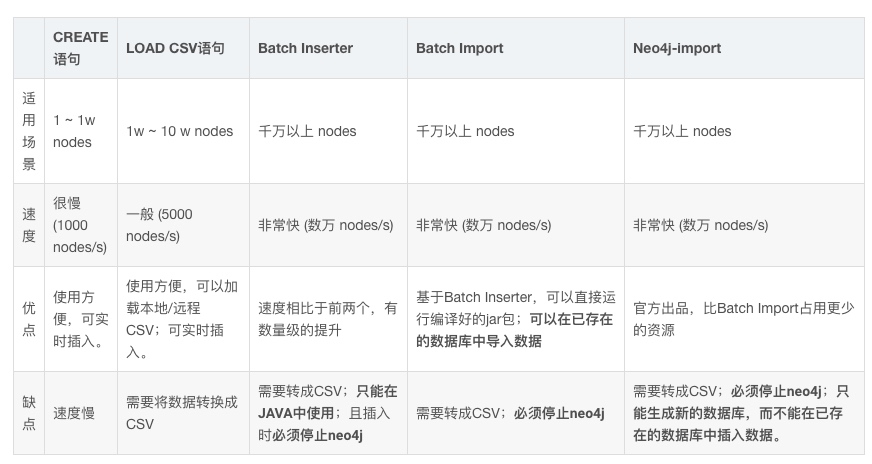
几种导入方式的对比
load csv速度参考
neo4j-import速度参考
2. 查看数据 启动neo4j服务 $NEO4J_HOME/bin/neo4j console
几个值得注意的地方:
外网访问(conf/neo4j.conf):dbms.connector.http.listen_address=0.0.0.0:7474
query日志需要单独配置打开。
默认用户名密码neo4j/neo4j(产出db文件不会重置用户名密码)
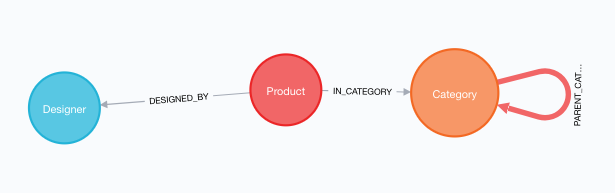
查看数据结构 demo结果如下:
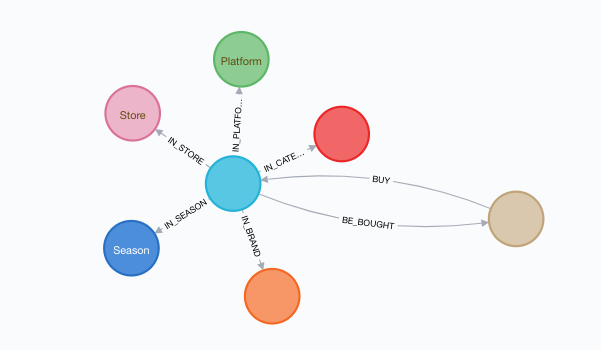
智子推荐db结果如下(不知道为啥有的球中间的文字没显示,感觉neo4j的前端还是有bug):
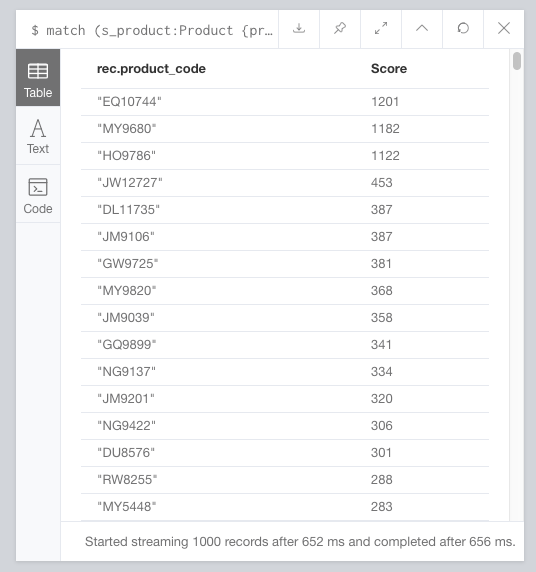
推荐尝鲜 1 2 3 4 5 // 智子关联规则推荐 match (s_product:Product {product_code: "IG6431"})-[:BE_BOUGHT]->(s_user:User)<-[:BE_BOUGHT]-(rec:Product) return rec.product_code, count(s_user) as `Score` order by count(s_user) desc limit 1000
结果如下:
tips
换行输入shift+回车
切换到换行模式,command+回车执行语句
参考